
System and custom entities
An entity is a unit of the NLU core of CAILA. An entity is a sequence of words linked by an intent or rule. For example: names, date and time, location, etc.
CAILA offers the following to the developer:
- System entities — built-in entities that the developer can activate in the entity editor.
- My entities — entities that the developer enters and constructs in the entity editor.
Using entities
Directly
All entities found in a phrase will be available in the script via the variable $jsapi.context().entities or $entities.
For example:
    state:
        q!: Information about product *
        a: Information about product: {{ $entities[0].value }}
In intents
Entities can be used in intents.
More details about filling in slots in intents and the Slot filling process
When the intent is activated, the data of the respective slot will be written to the variable $parseTree._<slot name>.
The initial text for which a match has been found will be written to this variable; alternatively, the DATA specified for this entity in the entity editor will be written to this variable.
For example:
    state:
        intent: /bye
        a: Action: {{ $parseTree._Action }}, Product: {{ $parseTree._Product }}

    state:
        intent: /sell
        a: Action: {{ $parseTree._Action }}, Product: {{ $parseTree._Product }}
In patterns
You can use entities in patterns by referencing them as @<entity name> or @<entity name>::<slot name>.
For an entity specified in a pattern, a slot is created automatically and the entity is included in the $parseTree.
The value of the entity will be available in the script as $parseTree._<slot name>.
For example:
    state:
        q!: * @Product::p1 *
        a: Information about product: {{ $parseTree._p1 }}
You can also use converters in entities. First, you need to define an entity through a named pattern using the patterns tag, and then declare a converter in it. For example:
patterns:
    $four = @four || converter = function() {return 4}
In this example we created @four entity, in which we declared converter. The converter function returns 4.
In the examples of STS classifier phrases
You can use entities in the phrase examples of STS classifier by referencing them as @<entity name> or @<entity name>::<slot name>.
For the entity specified in the example, a slot is automatically created and the entity is included in the $parseTree.
The value of the entity will be available in the script as $parseTree._<slot name>.
For example:
    state:
        e!: @Pizza::p2
        a: Information about pizza: {{ $parseTree._p2 }}
In entities
In JAICP entities can refer to other entities.
Let's have a look at entities behavior when:
Filling a Value field
Let's have a look at how the client's address fills in the entities. The address consists of two parts: street and house number.
Go to the CAILA > Entities > My entities tab on the control panel. Create the following entities:
street_namewith patterns:
Main
Weststreetwith a pattern:
@street_name streetNow let's create a address entity. It refers to the street entity and the @duckling.number system entity:
@street @duckling.numberNow let's say the client enters the message Main Street. The Value field is filled in the following way:
Mainin thestreet_nameentity;Main streetin thestreetentity.
If the client enters the message Main Street 15, then Value fills in as follows:
Mainin thestreet_nameentity;Main streetin thestreetentity;Main Street 15in theaddressentity.
Filling a Data field
Let's say we have our own online store that sells groceries. We will use the entities to specify from the client's request what kind of fruits and vegetables they want to buy.
Go to the CAILA > Entities > My entities tab on the control panel. Create the following entities:
fruitwith patterns:
apple
banana
limevegetablewith patterns:
potato
tomato
cucumber
In addition, specify values name and type in the DATA field for each pattern that will correspond to the name and type of the product. In the DATA field, you can add any information in JSON format that may be needed in the script.
For example, for the pattern banana specify:
{
    "name": "banana",
    "type": "fruit"
}
Do the same for each pattern of the vegetable entity. For instance:
{
    "name": "potato",
    "type": "vegetable"
}
Now, let's combine these entities into the grocery entity. Create an entity grocery and specify the patterns @vegetable and @fruit in the Dictionary field.
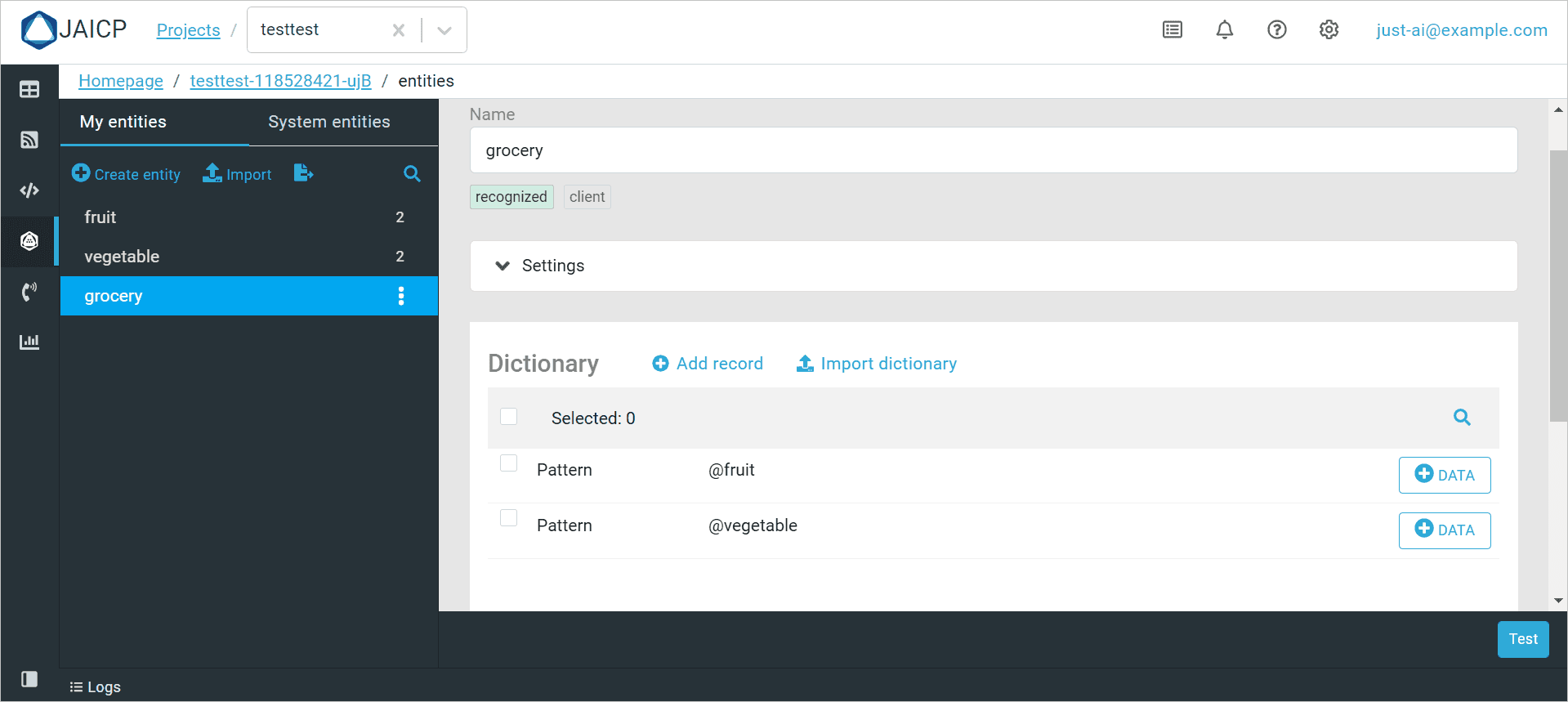
Let's look at the script. The user sends a message containing information about the product he wants. The bot's reply will consist of two messages: the name and type of this product.
state: Start
    q!: $regex</start>
    a: Hello! Our store offers a wide range of vegetables and fruit. What would you like to order?

    state: Grocery
        q!: * @grocery *
        script:
            $reactions.answer("The name of the product: {{ $parseTree._grocery.name }}");
            $reactions.answer("The type of the product: {{ $parseTree._grocery.type }}");
For example, the client writes the message Potato. The DATA field of the grocery entity will be filled with the information specified in the DATA field of the vegetable entity. Because the entity grocery contains the entity vegetable the message will be recognized by both these entities. In a result, the bot will send the following:
The name of the product: potato
The type of the product: vegetable
Filling the $entities array
Let us consider a situation where we have multiple matches for an entity search query.
Create a @City custom entity. Add the two values of South Carolina and North Carolina to the entity’s reference list. If a client requests Carolina, the bot must prompt to specify which city the client means.
All the values of the entity must be in the $entities array.
Use the CAILA API method:
PUT /cailapub/api/caila/p/{accessToken}/entities/{entityId}Add a parameter for the @City entity:
{
  "fuzzySearch": true    // can be used to find multiple values and add them to the array.
}
The $context.entities array will now contain the list with the South Carolina and North Carolina values, and the bot may prompt the client to specify the city.